This post aims to explore the concept of Agentic development and the different architecture patterns that surround it, in an effort to understand and learn about it myself.
Making a tool call to an AI can help you with the most basic of AI applications. Building a simple AI chat application, or any sort of text/image/video generator generally requires a single tool call to an AI provider's API. The response is parsed and returned back to the user. But for more complex workflows, the need arises to move beyond single AI calls to create "AI Agents" - systems that can plan, execute, retry and adapt. Think of it as building a reliable distributed system, where some of the "services" are AI models.
Imagine you're building a system to automatically handle customer support tickets. You start with the obvious approach - take the user complaint query and pass it off to an AI model to generate a response. This works for simple cases, but breaks down quickly for more sophisticated use cases.
To provide better support, the AI must look at customer's order history, check inventory levels, research company policies, and possible escalate to a human agent. A single AI can't orchestrate all these steps reliably. The AI should "think" through multiple solutions independently, take decisions on what to do next, and handle failures gracefully.
This is fundamentally different from traditional software where you write explicit code for each step. The Agents are autonomous systems that plan their own execution, adapt according to need, retry in cases of failures, and maintain context across multiple interactions.
Here's my mind-map of what I visualize of an AI Agent:
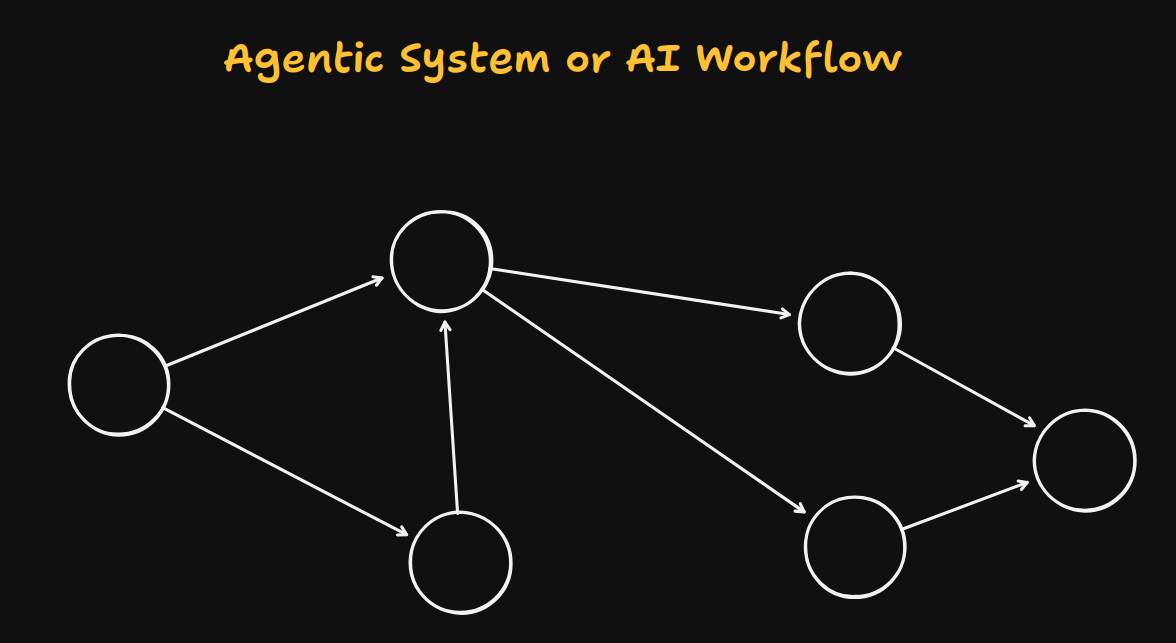
Each node can be an Agent in itself, or a single AI call. Each individual component completes one step of the entire task, and as a whole generates the desired result. The nodes can be a Planner component, that plans the tasks required to successfully complete the user's query, an Executor component that iteratively executes those tasks, a Connector component that connects with third-party services if required, a Logger, a Synthesizer, or anything else. The key is, unlike traditional systems where explicit conditioning is required using if-elses for each scenarios, these components work together with a shared context and take autonomous decisions to complete a given task.
However, the core problem is reliability at scale. One AI call might work 90% of the time, but when you chain together 4-5 different AI calls together, success rate plummets. You need architecture pattern to handle the inherent unpredictability of AI, while maintaining reliable system architecture. This is where the need for AI Agent Architecture Patterns come in.
Foundational Requirements for Agents
The core of AI Agents rests on three key principles that distinguish it from traditional software and simple AI integrations.
-
First is Stateful planning: Agents are stateful systems, unlike traditional HTTP APIs that are stateless. Agents need to know what the end goal is at each step, and the context of what has already been tried to achieve it. It needs to remember what it has tried, what worked, and what failed. Think of it like a person working through a complex problem: they keep notes, refer back to previous attempts, and adjust their approach based on what they've learned. In technical terms, this is called "maintaining agent state" across multiple AI calls.
-
Second is Autonomous Decision-Making: Agents differ from traditional systems in the sense that they have the ability to make autonomous decisions based on the information they discover, instead of explicit programming for every scenario. Give them an end goal and they should be able to figure out how to reach there. This is called "agentic behavior" - AI acts independently within defined boundaries.
-
Third is graceful failure handling: When an AI call fails, it should have strategies to recover. These are "fallback strategies" and are an important aspect of production reliability. These could be retrying, fetching backup data sources, or escalating for human intervention.
Architecture Patterns
Since we're starting to associate Agents with distributed systems, many standardized patterns have come up to design these systems in a way that best suits the need of the application and works well in production.
-
Linear Agent Pattern: As the name suggests, this architecture is designed for systems that execute tasks in a linear way. The AI follows a predetermined sequence of steps, but with the AI making decisions at each stage. A good example is a research agent that follows: plan -> search -> summarize -> analyze -> report. The agent maintains state between each stage (storing search results, summaries, etc), and can retry individual steps if they fail.
-
Conditional Agent Pattern: Quite similar to the Linear pattern, but with one or more conditional branches. Now the agent can make decisions about which path to take based on previous results. A code review agent might take different approach based on whether the user has asked for a bug fix or a new feature. However, the agent autonomously decides without path to take without any pre-conditioning logic.
%% - Recursive Agent Pattern:
- Event Driven Agent Pattern %%
Research Agent
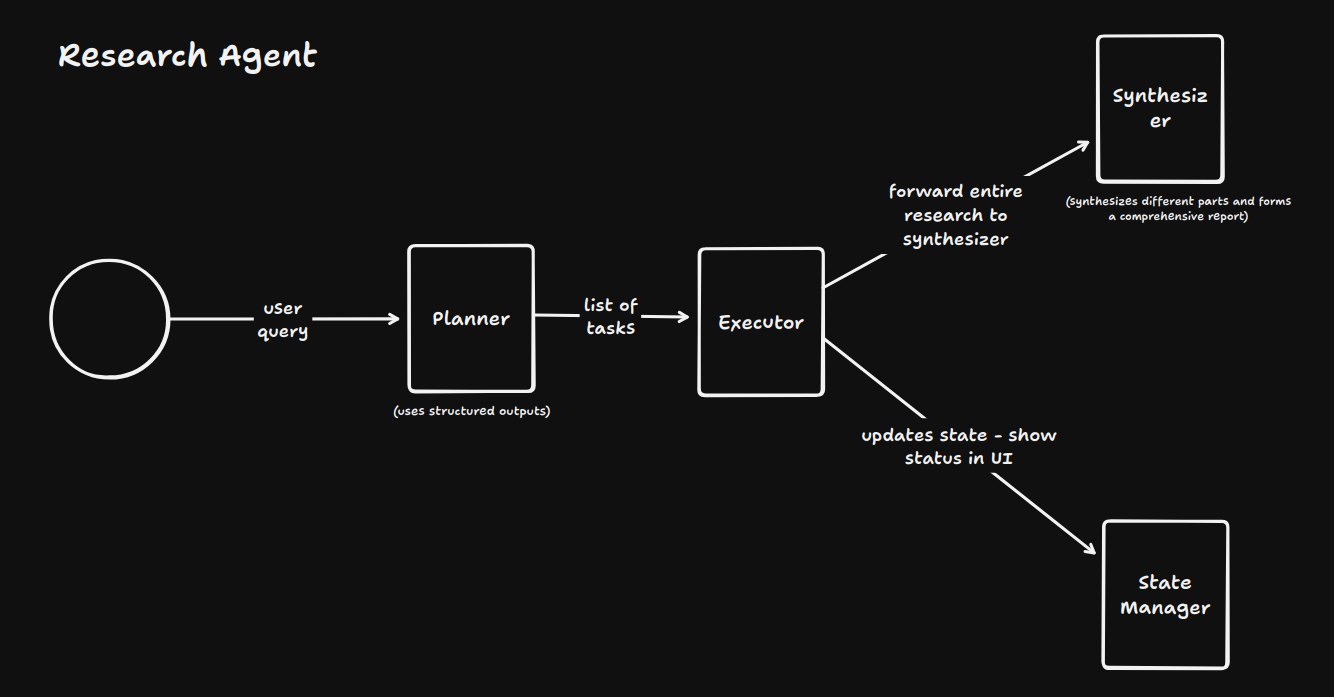
Here's the code for a research agent that I developed to understand these concepts:
- The backend code:
import express from "express";
import { generateObject, generateText } from "ai";
import { google } from "@ai-sdk/google";
import { z } from "zod";
import dotenv from "dotenv";
import cors from "cors";
dotenv.config();

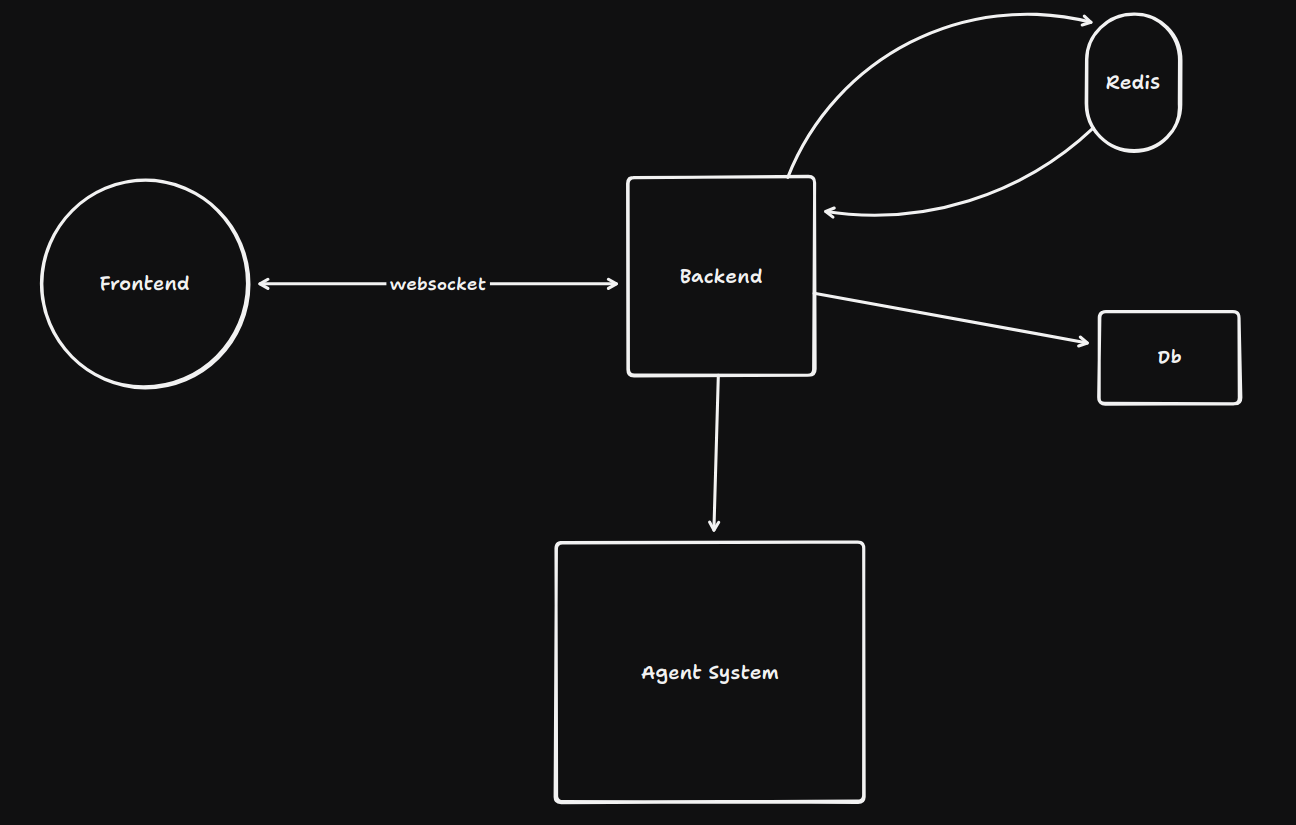
// Note: This is a basic example. For production use-cases, set up websockets to stream real-time updates/logs and provide live-feedback in the frontend, use redis for storing agent state, and postgres for persistent storage (completed research sessions, learned patterns, agent configuration, etc.)

const app = express();
app.use(express.json());
app.use(cors());

const taskSchema = z.object({
    tasks: z.array(z.string()),
    reasoning: z.string(),
});

type TaskSchemaType = z.infer<typeof taskSchema>;

app.post("/api/research", async (req, res)=> {
    const { query } = req.body;

    if (!query) {
        return res.status(400).json({ error: "Query is required" });
    }

    // planner
    const tasks = await planner(query);

    // executor
    const results = await executor(tasks.tasks);

    // state manager

    // synthesizer
    const report = await synthesizer(results);

    // output

    return res.json({
        message: "Research completed successfully",
        data: {
            report,
            tasks,
            results,
        }
    }).status(200);
})

async function planner(query: string) {
    const response = await generateObject({
        model: google("gemini-2.0-flash"),
        prompt: `
        You are a helpful assistant that plans research tasks. You are given a query and you need to plan the research tasks.
        You need to return the research tasks in a JSON format, along with the reasoning process. Generate 3-5 comprehensive mutually exclusive tasks.
        `,
        schema: taskSchema,
    })

    console.log(`Planner response: ${response.object}`);

    return response.object as TaskSchemaType;
}

async function executor(tasks: string[]) {
    const results: string[] = [];
    for (const task of tasks) {
        const response = await generateText({
            model: google("gemini-2.0-flash"),
            prompt: `
            You are a helpful assistant that executes research tasks. You are given a task and you need to execute it.
            `,
            messages: [
                {
                    role: "user",
                    content: task,
                },
                {
                    role: "data",
                    data: results,
                    content: "The results of the previous tasks",
                }
            ]
        })

        results.push(response.text);
    }

    console.log(`Executor results: ${results}`);

    return results;
}

async function stateManager(results: string[], query: string) {
    // send current state back to the user to update the UI
    // update the state with the new results
    const currentState = {
        results,
        query,
    }

    return currentState;
}

async function synthesizer(results: string[]) {
    const response = await generateText({
        model: google("gemini-2.0-flash"),
        prompt: `
        You are a helpful assistant that synthesizes research results. You are given the results of the research tasks and you need to synthesize them into a coherent report.
        `,
        messages: [
            {
                role: "data",
                data: results,
                content: "The results of the research tasks",
            }
        ]
    })

    console.log(`Synthesizer response: ${response.text}`);

    return response.text;
}

app.listen(8000, () => {
    console.log("Server is running on port 8000");
});- The frontend code:
import { useState } from "react";
import "./App.css";

function App() {
   const [query, setQuery] = useState("");
   const [data, setData] = useState<{
      report: string;
      tasks: {
         tasks: string[];
         reasoning: string;
      };
      results: string[];
   } | null>(null);
   const [loading, setLoading] = useState(false);

   const handleResearch = async () => {
      setLoading(true);
      const response = await fetch("http://localhost:8000/api/research", {
         method: "POST",
         body: JSON.stringify({ query }),
         headers: {
            "Content-Type": "application/json",
         },
      });

      const data: {
         report: string;
         tasks: {
            tasks: string[];
            reasoning: string;
         };
         results: string[];
      } = await response.json();
      console.log(data);
      setData(data);
      setLoading(false);
   };
   return (
      <>
         <div>
            <h1>Research Assistant</h1>
            <input
               type='text'
               placeholder='Enter your query'
               value={query}
               onChange={(e) => setQuery(e.target.value)}
            />
            <button onClick={handleResearch} disabled={loading}>
               {loading ? "Researching..." : "Research"}
            </button>
         </div>

         {data && (
            <>
               <div>
                  <h2>Report</h2>
                  <p>{data.report}</p>
               </div>
               <div>
                  <h2>Tasks</h2>
                  <p>
                     {data.tasks.tasks.map((task) => (
                        <li>{task}</li>
                     ))}
                  </p>
               </div>
               <div>
                  <h2>Results</h2>
                  <p>
                     {data.results.map((result) => (
                        <li>{result}</li>
                     ))}
                  </p>
               </div>
            </>
         )}
      </>
   );
}

export default App;- A better architecture for production use-cases: